Peptide Calculator for Your Store: How to Build a Compliant Lab Tool
How a peptide reconstitution calculator works, the wording and design that turn it into a dosing tool, and how to add a compliant one to a WooCommerce store.
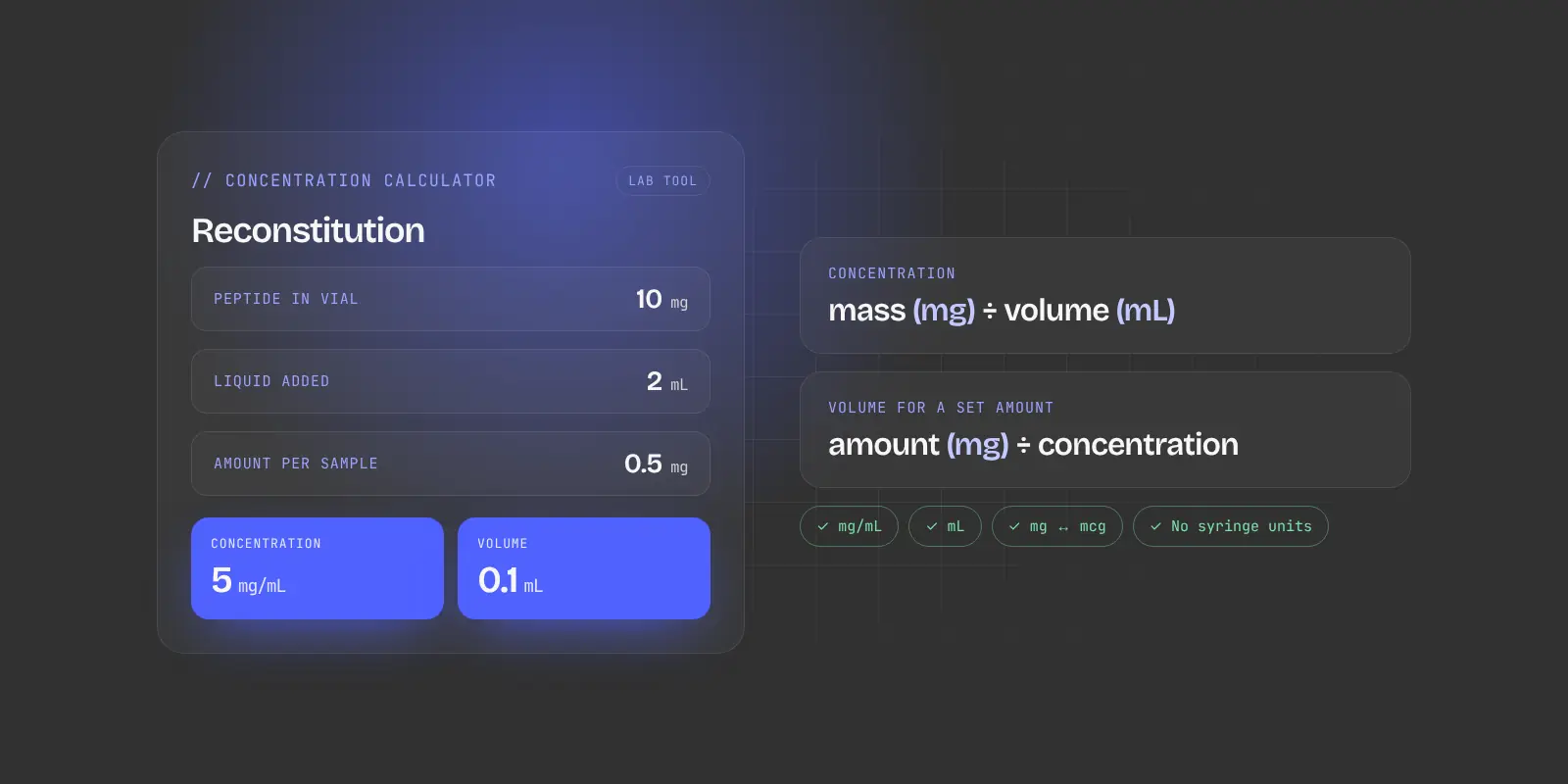
A peptide calculator should be a lab concentration tool: peptide mass divided by liquid volume gives mg/mL, and the amount needed divided by concentration gives the volume in mL. Avoid dosing language, insulin syringe units, preset protocols and injection supplies sold next to it.
A peptide calculator is one of the most useful features a research peptide store can offer. Researchers come back to it, it keeps them on your site instead of a competitor’s, and it shows you understand how your products are used in the lab.
It’s also one of the easiest features to get wrong. Framed the wrong way, a calculator becomes a dosing tool, and dosing content is one of the clearest signals of intended human use. This guide explains how a compliant calculator works, what to avoid, and how to add one to a WooCommerce store.
This article is general information about website features, not legal or regulatory advice. Review your calculator’s wording with your own legal counsel.
What a peptide calculator actually does
Research peptides usually ship as a dry, freeze-dried powder in a vial. Before use in the lab, the powder is dissolved in a measured volume of liquid, a step called reconstitution. A calculator answers two simple questions:
- What is the concentration? How much peptide is in each millilitre once the powder is dissolved.
- What volume holds a given amount? How much solution a researcher needs to measure out to get a specific quantity of peptide for an experiment.
The math is basic laboratory arithmetic:
| Calculation | Formula | Example |
|---|---|---|
| Concentration | Peptide mass (mg) ÷ liquid volume (mL) | 10 mg ÷ 2 mL = 5 mg/mL |
| Volume for a set amount | Amount needed (mg) ÷ concentration (mg/mL) | 0.5 mg ÷ 5 mg/mL = 0.1 mL |
| Unit conversion | 1 mg = 1,000 mcg | 0.5 mg = 500 mcg |
That’s all a good calculator needs to do. The difference between a compliant tool and a risky one is almost entirely in the wording and design around those numbers.
Lab tool vs dosing tool: where the line is
Regulators judge your products by your whole website. In 2026, FDA warning letters to online peptide sellers cited website content that pointed to human use, including bundled injection supplies, even when the products were labeled “research use only.” A calculator presented as a personal dosing guide adds exactly that kind of signal.
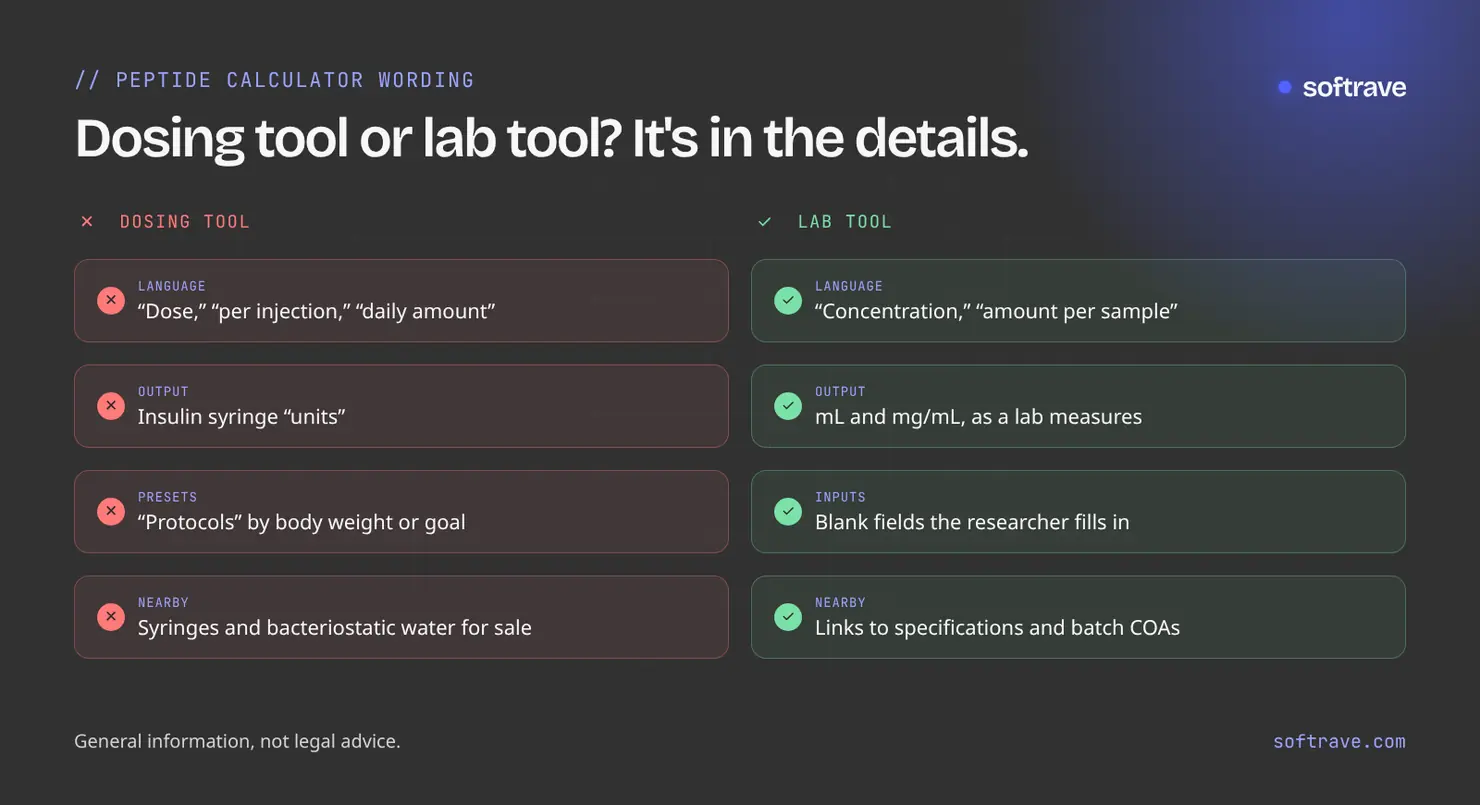
| Avoid | Use instead |
|---|---|
| “Dose,” “dosage,” “per injection,” “daily amount” | “Amount per sample,” “target quantity,” “concentration” |
| Results in insulin syringe “units” | Results in mL and mg/mL, as a lab would measure |
| Syringe images or injection instructions | A neutral vial-and-solution diagram, or no illustration |
| Preset “protocols” for a body weight or goal | Blank inputs the researcher fills in |
| Links to buy bacteriostatic water or syringes next to the calculator | Links to your COA library and product specifications |
Syringe “units” deserve a special mention. Many calculators online convert results into insulin syringe units because that’s how people measure doses at home. A lab tool has no reason to do that, so it’s one of the clearest human-use signals you can avoid.
What a good peptide calculator includes
- Simple inputs: peptide mass in the vial (mg), volume of liquid added (mL) and, optionally, the amount needed per sample (mg or mcg).
- Clear outputs: concentration in mg/mL and mcg/mL, and the volume in mL that holds the amount entered.
- Unit switching between mg and mcg, since mistakes between the two are the most common error.
- Input checks that catch empty fields, zeros and impossible values.
- A short research-use notice beside the tool, consistent with the rest of your site.
- Links to product specifications and COAs, so researchers can confirm the exact amount per vial for the batch they received.
How to add one to a WooCommerce store
Option 1: A dedicated calculator page
Build the calculator as its own page, linked from your main menu and product pages. A standalone page is easy to find, easy to bookmark and can rank in search for terms like “peptide reconstitution calculator,” bringing in visitors who may not know your store yet.
Option 2: Built into product pages
Add a compact version to each product page that pre-fills the vial’s peptide mass from the product data. Researchers get accurate numbers without typing, and the tool stays tied to the exact product and batch.
Most stores do both: a full calculator page for search and returning visitors, and a pre-filled version on product pages.
Avoid generic plugins without checking them
Ready-made calculator plugins and embeds are quick to install, but many are built for personal use and show syringe units or dosing language by default. If you use one, check every label and output. A custom calculator built for your store gives you full control over the wording and design, and it matches your brand.
Calculator checklist
- Inputs in mg and mL, with mg/mcg switching
- Outputs in mg/mL and mL, not syringe units
- No “dose,” “injection,” “protocol” or goal-based presets
- No syringe imagery or injection instructions
- No cross-sells for injection supplies next to the tool
- Research-use notice consistent with the rest of the site
- Links to product specifications and batch COAs
- Validation for empty or impossible values
- Tested on mobile
Get a calculator built for your store
Softrave builds branded peptide calculators as lab concentration tools, either as a standalone page or built into WooCommerce product pages, as part of our peptide store website development service. Already have one? Our free store health check reviews your calculator’s wording along with the rest of your store. For the wider picture, see why peptide stores get rejected.
Frequently asked questions
What does a peptide reconstitution calculator do?
It works out the concentration of a peptide after the powder is dissolved (mass in mg divided by liquid volume in mL) and the volume of solution that holds a given amount. It is basic laboratory arithmetic.
Is it safe to add a peptide calculator to a research peptide store?
It can be, if it is presented as a lab concentration tool: results in mL and mg/mL, no dosing language, no syringe units or imagery, and no injection supplies sold next to it.
Why should a peptide calculator avoid insulin syringe units?
Syringe units are how people measure doses at home, not how labs measure solutions. Showing them is one of the clearest signals that a tool is meant for human use.
Should the calculator be its own page or on product pages?
Ideally both: a standalone page that can rank in search and that researchers bookmark, plus a compact version on each product page that pre-fills the vial amount.